On time, or a full refund.How the guarantee works

White label headless and Next.js development

Headless when it’s worth it. A straight answer when it isn’t.

White label headless development for agencies: Next.js or Astro front ends, built in your Git, on a headless CMS your client’s editors will actually like (or on a Shopify store). We quote every build after a call, at a fixed price, with the delivery date in writing.

  • On time, or a full refund
  • 30-day bug warranty
  • Code in your Git, pull requests you can read
  • Speed targets tested at handover

Headless, in production.

Three sites our developers built on Next.js and Astro.

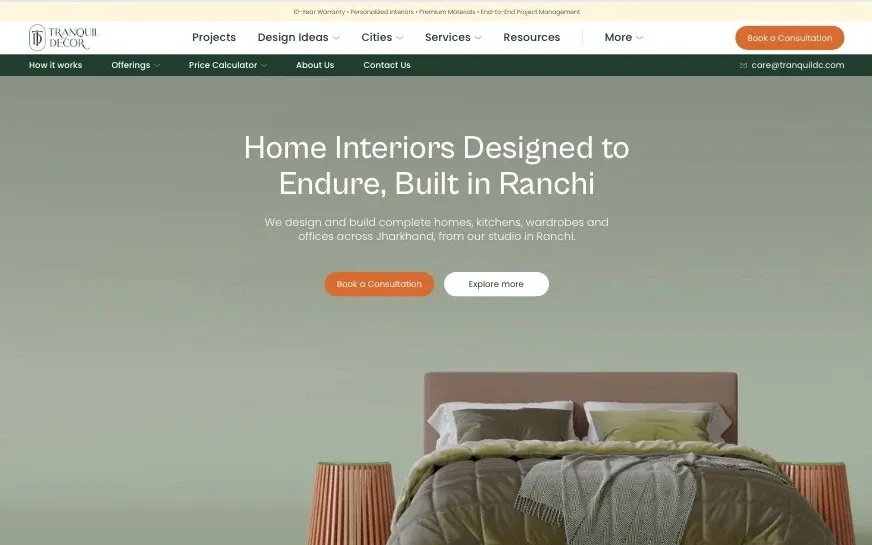
  • The Tranquil Decor homepage, with a bed and two side tables on a sage green background.

    Web app design & development · 2026

    Tranquil DecorBuilt on Next.js

    An interior design studio that needed two things: a website for its clients, and a web app for quoting. Homeowners sign up, see a price range and book a site visit. The studio’s designers then build an itemised quote and send it to them, all without leaving Tranquil Decor’s platform.

    About this project: Tranquil Decor
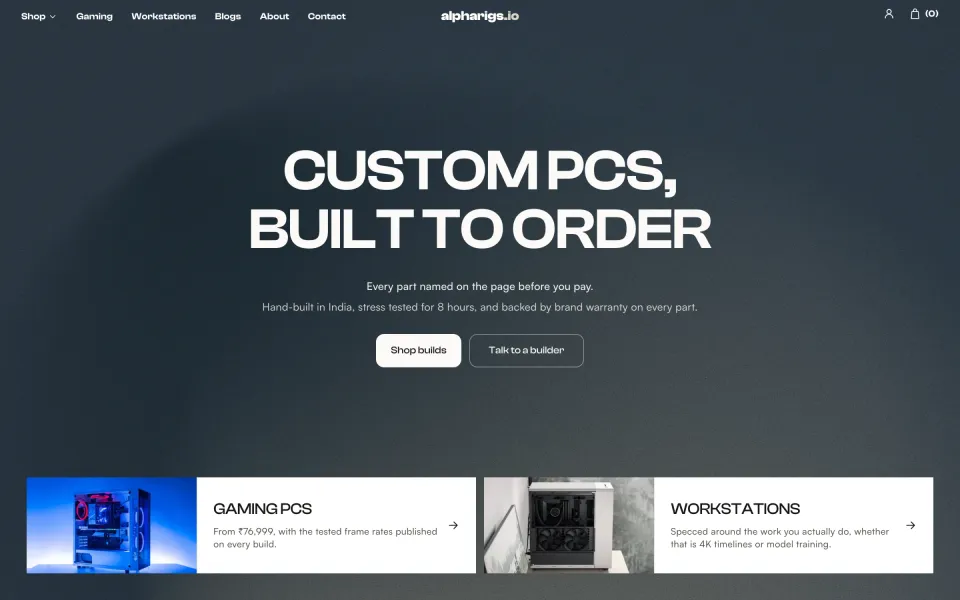
  • The AlphaRigs homepage, headed Custom PCs, built to order.

    eCommerce design & development · 2026

    AlphaRigsBuilt on Astro

    A builder of custom gaming PCs and workstations. Every build has its own page with the full parts list, tested frame rates and a price, and a short quiz points a buyer to the right machine.

    About this project: AlphaRigs
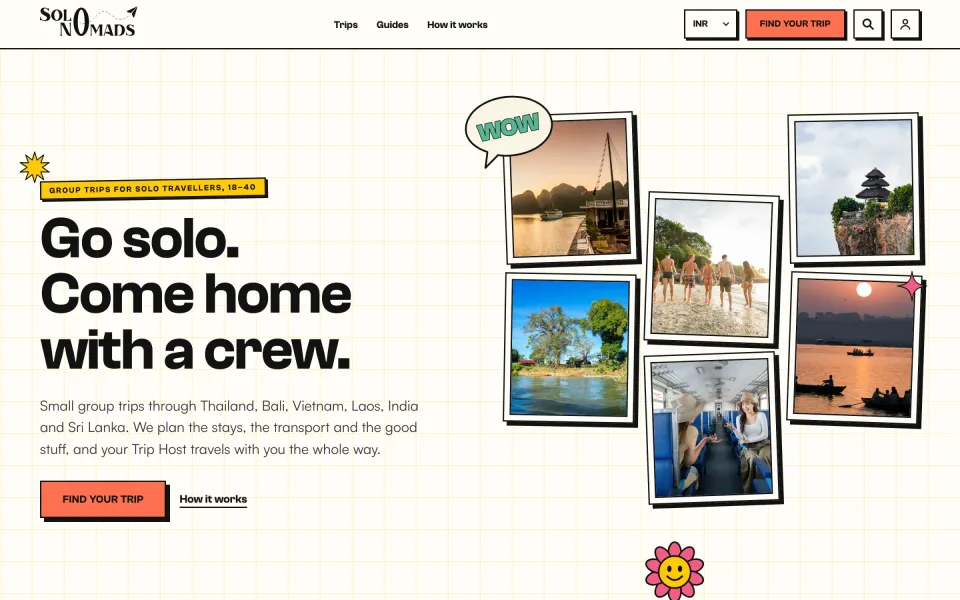
  • The SoloNomads homepage, headed Go solo. Come home with a crew., beside a collage of travel photos.

    Web design & development · 2026

    SoloNomadsBuilt on Next.js

    A travel company that runs small group trips for solo travellers aged 18 to 40 needed a website that could sell trips while educating people about them as well. A visitor should be able to easily find a trip they want to go on, see its price in their own currency, reserve a spot, and learn about the culture, festivals and more.

    About this project: SoloNomads
See all work

Shown with written consent. Your own clients’ work only ever appears here if you say so.

When your client needs headless, and when they don’t.

Headless means the content lives in a CMS and the website is built separately, in code. Most sites don’t need it, and we’d rather tell you that now than after the quote. Tick what’s true of your client’s project to see which way it leans.

Worth it when
Not worth it when

Try it on your client’s project

Tick what applies.

We’ll show which way it leans, and what to do next. A few ticks can’t settle it, but they’re a good start.

Headless also takes longer to build than a WordPress or Webflow site, which takes 15 to 25 business days. The delivery date for a headless build is written into your quote. If headless is the wrong fit, we’ll recommend the platform that suits instead.

01

How our headless builds are made.

Every headless build we ship is held to these three. Pick one to see it working.

  1. Each change gets a preview link and automated checks. Someone who didn’t build it runs QA before you see it.

    • The repo sits in your Git organisation from day one
    • Type check, lint and build run on every pull request
    • One preview link per pull request, on your subdomain
  2. Your client’s editors work in the CMS and see the page update. The content model lives in code, so both stay in step.

    • A content model designed around the pages
    • Roles, permissions and help text for your client’s team
    • Live preview of unpublished changes, where the CMS supports it
  3. Lighthouse CI runs against a performance budget, so a slow change is flagged before it merges.

    • Key templates: LCP under 2.5 s and CLS under 0.1
    • Lab-tested on a mid-range phone at handover
    • Pages pre-built or cached at the edge where content allows

02

Part of your agency, down to the email address.

We work as your staff, in your repo and your tools, so as far as your client can tell, there’s only your agency.

  • Your email, your name

    Your Project Manager works as name@youragency.com, and every commit in the repo is authored from an address on your domain.

  • In your Slack and board

    Pull requests, preview links and questions land where your team already works, so nobody learns a new tool.

  • On your hours

    Your Project Manager works your business day and aims to reply within 2 working hours during a project.

  • No trace of us

    You won’t find our name in the footer, the page source, the code or anywhere in the repo history.

How we work as part of your agency

What your order commits us to.

  • On time, or a full refund.

    The delivery date goes in your signed order. On a fixed-price order, if we miss it for a reason on our side, the whole fee comes back.

    How the guarantee works
  • 30-day bug warranty.

    Anything we built that breaks in the first 30 days after launch is fixed free. The 30 days start at launch, or 30 days after handover-ready, whichever comes first; report the bug in writing.

    What the warranty covers

A standard stack, in your accounts.

Next.js or Astro on the front, any popular headless CMS behind it. Headless means more parts: a repository, a CMS and a host, each with its own account and bill. Hover or tap a tool to see what we set up.

Front ends

Next.js or Astro, in TypeScript, whichever fits the site.

  • Next.jsThe App Router front end in TypeScript: server-rendered or pre-built pages, metadata, image handling and route handlers.
  • AstroVery fast, mostly static front ends for content sites, with islands of interactivity only where a page needs them.
  • ReactA typed component library, built once and reused on every template.
  • TypeScriptStrict types across components, content queries and integrations.

Headless CMS

In an account your client owns, chosen for their editors and budget.

  • SanityContent types written in code, a custom editing studio, and live preview for editors.
  • ContentfulA content model with roles and workflows, delivered through its API.
  • StoryblokA visual editor over reusable blocks, so marketers can assemble pages safely.
  • WordPressWordPress as the content system your client’s editors already know, with the front end built separately.
  • PayloadA code-first CMS and admin panel that sits inside your front end’s codebase.
  • StrapiAn open-source CMS with content types, roles and an API.

Hosting and deploys

On your client’s own host account, with a preview for every pull request.

  • VercelA project in your client’s own account, with a preview for every pull request.
  • NetlifyA project in your client’s own account, with a preview for every pull request.
  • CloudflareA project in your client’s own account, with a preview for every pull request.

Design, code and review

Designed in Figma, then Git in your organisation, with pull requests your team can read.

  • FigmaYour design, read through its styles and variables and built as components.
  • GitHubThe repository in your organisation, with pull requests your team can review before anything merges.
  • GitLabThe repository in your group, with merge requests and pipelines.
  • BitbucketThe repository in your workspace, with pull requests your team can review.
  • ESLintLinting on every pull request, so the codebase stays consistent.
  • PrettierAutomatic formatting, so a diff only shows real changes.
  • LighthouseLighthouse CI runs on every pull request against a performance budget.

Not sure which CMS? The scope will recommend one for your client’s editors and budget, with the reason. Has your client already picked one that isn’t listed, such as Hygraph? If it has an API, we can work in it, and we’ll tell you if we’d advise against it.

Next.js or Astro?

The quote covers either. This is how we choose between them, and what each costs you.

Next.js

A React framework for sites that behave like apps.

Good at

  • Logged-in areas, carts, dashboards and pages that change for each visitor
  • Pages built ahead of time, built on demand or rendered per request, chosen page by page
  • A very large React ecosystem, and plenty of developers who know it

Watch out for

  • More JavaScript reaches the browser by default, so it takes more care to keep pages light
  • More moving parts to maintain: a server runtime, caching rules and frequent major releases
  • More than a rarely changing brochure site needs

We’d pick it for: Accounts, heavy interactivity, dynamic or personalised data, or a site that may grow into an app.

Astro

A content-first framework that ships almost no JavaScript.

Good at

  • Marketing sites, blogs and documentation whose pages are the same for every visitor
  • Very quick pages: HTML by default, with interactive islands only where a page needs one
  • Static output that any host serves cheaply, with little to keep patched

Watch out for

  • Not built for heavy app-like interfaces or lots of per-user pages
  • A smaller ecosystem than React and Next.js, and fewer developers who know it
  • Published changes trigger a rebuild, unless a server is added on top

We’d pick it for: Content-led, mostly static sites with little interactivity, where speed and low upkeep come first.

Either one can sit on any of the CMSs above, in TypeScript, with pull requests and a preview for every change. The quote covers whichever we use, and the written scope says which one we’d pick and why.

Headless Shopify storefronts, built white label.

A custom Next.js front end on a Shopify store. Most stores are better off on a theme; if your client’s is one of them, that’s what we’ll recommend.

White label Shopify development
The front end
Next.js in TypeScript, in your Git, reading products, collections and the cart from Shopify’s Storefront API, which is GraphQL.
What stays in Shopify
Products, inventory, orders, payments and the checkout. The cart hands the buyer to Shopify’s own checkout, so your client’s team still runs the store from the Shopify admin.
What your client gives up
The theme editor. There’s no theme, so nobody can drag sections around in Shopify any more; the pages their team needs to change are modelled in a headless CMS instead.
Apps
An app that adds a block to an Online Store 2.0 theme has no theme to add it to. Each one your client relies on (a reviews app, say) is connected through its API or replaced, and we list them all in the scope.
When it’s worth it
A content-heavy brand that needs a front end no theme can give it. For a standard catalogue and checkout, we’d go with a customised or custom theme: it costs less and is easier to live with.
Price and date
Quoted after a call, as a fixed price in writing. The delivery date goes in your signed order, and the on-time guarantee applies to it.

Search, access and security, built in.

Code review, the CMS and speed are covered above. These three go in from the first day of every build.

  • Technical SEO

    Real HTML that Google, and AI answers, can read.

    • Semantic HTML: one H1, ordered headings, real links and buttons
    • Titles, descriptions and canonicals editable in the CMS
    • Structured data and XML sitemaps generated from the content
    • A redirect map whenever a build replaces an existing site
  • Accessibility

    Keyboard and screen-reader tested.

    • Built to WCAG 2.2 AA, with the limits set out in your order
    • Automated checks (axe) on every template
    • A manual keyboard pass, and screen-reader spot checks on key templates
    • Motion reduced for visitors who ask their device for it
  • Security and secrets

    Nothing on the site depends on us after handover.

    • API keys and tokens in the host’s environment settings, never in the repo
    • Named accounts with the least access the job needs, two-factor on every one
    • Security headers set, and dependencies kept up to date during the build
    • Every third-party service listed in the handover document

Headless builds are quoted, at a fixed price.

Every headless build is quoted after a short call, as a fixed price with a delivery date, in writing. The price only moves if the scope does, and you approve any change first.

Headless Shopify storefront

A custom Next.js front end on a Shopify store.

Quoted after a call

Delivery date in your quote · on time, or a full refund

  • A Next.js front end in TypeScript, on Shopify’s Storefront API
  • Products, orders, payments and the checkout stay in Shopify
  • Pages your client’s team changes, modelled in a headless CMS
  • Each app your client relies on connected through its API, or replaced, and listed in the scope
  • Code in your Git, with a preview link for each change

Web app or dashboard

Portals, dashboards and MVPs, built in Next.js.

Fixed quote after the sprint

Delivery date in your quote · on time, or a full refund

  • Starts with a Scoping Sprint: requirements, user flows and architecture
  • A written scope and a fixed price for the build
  • The sprint fee credited against the build if you go ahead within the window in your order
  • Built in Next.js to the fixed quote, dated in your signed order

Web app development in full

How the quote works

No two headless builds are the same, so we quote each one after a 20-minute call.

Or send a brief

What we need to quote:

  • The brief or the Figma
  • The CMS your client uses or wants
  • The integrations it needs
  • Whether it is a store

You get a written scope, a fixed price and a delivery date within 2 business days of the call.

What the same quote can cover

Tell us on the call. Each one is priced inside the same written quote.

  • Design in Figma

    Desktop and mobile, handoff-ready components, when you don’t have the designs yet.

    Quoted after a call

  • Additional pages

    On an existing template, with QA.

    Quoted after a call

  • Integration

    A CRM, email platform or booking tool connected in code, beyond what a build includes.

    Quoted after a call

  • Content migration

    Pages or posts moved into the CMS. We choose the method, and check the result by hand.

    Quoted after a call

Our headless process, start to launch.

Five steps, each with a deliverable. The dates are written into your quote. The content model comes before the build, and every change arrives as a pull request with a preview.

See the full process

  1. Brief and scope

    We review the brief, the designs and the content: templates, content model and integrations. You get a written scope, the CMS and front end we recommend with the reason, and a fixed price.

    Day 0⁠–⁠2Scope and stack choice
  2. Design and content model

    We design the templates in Figma or review yours, then map each one to components and CMS content types before the build starts.

    Before the buildContent model
  3. Build on previews

    Built in your repo one pull request at a time, each with a preview link on your subdomain, and a written update every week with a staging link.

    During the buildWeekly update
  4. QA and performance

    Internal QA before you see anything: 6 breakpoints on real devices, keyboard and screen-reader checks, and Lighthouse checks on the key templates.

    Before you see itTested build on staging
  5. Handover and launch

    The build is handover-ready on staging, with the handover document and (where your order includes one) a walkthrough video. Once you approve it, it goes live on your client’s host in a quiet hour, and we check the redirects.

    On the date in your orderHandover pack

Repo, hosting and who pays.

The code, the accounts and the bills stay with you and your client. The handover document lists them all.

What’s included, in full
The code
In a repository in your GitHub, GitLab or Bitbucket organisation from the first day. All rights pass to you once the order is paid. Third-party tools such as Next.js, Astro and the CMS stay under their own licences.
Hosting
A Vercel, Netlify or Cloudflare project on your client’s own host account. We don’t sell hosting. Your client pays the host directly, and we set the project up once, free.
The CMS
An account in your or your client’s name, on the plan their team needs, billed to them by the CMS maker. If we buy anything for you, it’s at cost and only with your written approval.
Design files
In your Figma, from the first day. All rights pass to you once the order is paid.
Other services and keys
Email, search, analytics or payment services are set up in your client’s accounts. API keys live in the host’s environment settings, and the handover document lists every service and any keys we created.
Domain and DNS
They stay with your client’s registrar. We change only the records we need to, and tell you which ones.
Our access
Named accounts with the least access the job needs, two-factor on every one. At handover, unless you’re on a plan, we confirm in writing that everything is in your systems, and you switch our access off.

After launch: someone who knows the codebase.

Headless sites don’t have plugins to update, but they do need dependency updates, security patches and a developer who knows the code. Our care plans are for WordPress, Webflow and Shopify sites, so after the 30-day warranty that work goes on a Flex 40 capacity plan at $1,200 a month: 40 hours across design, development, QA and project management, with your assigned Project Manager and a written update every week.

See capacity plans

Try us on one small project first.

Pick any one item from our price list and treat it as a pilot, with no commitment beyond it.

  • Your first project is paid through escrow, and the money is released as you approve the work.
  • Not happy with it? We fix it within 5 business days. Still not happy? You don’t pay (once per agency).
  • Like every fixed-price project: on time, or a full refund.

Headless questions.

What agencies ask before they sell their first headless build.

All questions

A headless website keeps its content in one system (the CMS) and builds the site that shows it separately, usually in Next.js or Astro. It’s faster and more flexible than a theme. It also costs more to build, and structural changes need a developer.

Headless is worth it when the site has to be very fast at scale, when one body of content feeds a site, an app and other channels, when the client needs custom integrations or logic, or when editors want a modern editor on a fully custom front end. It isn’t worth it for a 10-page marketing site with a blog, when the budget can’t cover a developer for structural changes later, or when the client’s team is already happy in WordPress or Webflow; for those, we’ll recommend one of the two instead.

It’s quoted after a short call, because no two headless builds are the same. Tell us about the brief or the Figma, the CMS, the integrations and whether it’s a store. You get a written scope, a fixed price and a delivery date, and the price only changes if the scope does. A web app starts with a Scoping Sprint instead: it ends in a fixed quote, and its fee is credited against the build if you go ahead within the window in your order.

Only if the scope changes, for example more templates or pages, an extra integration, or a brief that changes after sign-off. We price the change in writing and add nothing until you approve it. On a fixed-price order, if we miss the delivery date in your signed order for a reason on our side, the whole fee comes back.

Whichever suits your client’s editors and budget. We build on Sanity, Contentful and Storyblok, use WordPress as a headless CMS when a client’s team already knows it, and can work in others such as Payload, Strapi and Hygraph. Unless you’ve already picked one, the scope recommends a CMS and gives the reason. The account is in your name or your client’s, and its plan and seat costs are theirs to pay.

Next.js suits sites with logged-in areas, heavy interactivity or data that changes for each visitor. Astro suits content-led, mostly static sites, with very little JavaScript to maintain. Whichever it is, the code is TypeScript, it sits on any of the CMSs, and the quote covers it. The written scope says which we’d pick and why; the full comparison is above, under “Next.js or Astro?”.

Yes. The repository sits in your GitHub, GitLab or Bitbucket organisation from the first day, and commits come from email addresses on your domain. Every change is a pull request with its own preview link, so you can read it, and someone who didn’t build it does our internal QA before you see the build.

Your client, on their own Vercel, Netlify or Cloudflare account. We set the project up there once, free, and deploy to it. We don’t sell hosting, so your client pays the host and the CMS maker directly. If we ever buy something for you, it’s at cost and only with your written approval.

No. The stack is standard: TypeScript, with a documented component library, in your repo from the first day. All rights pass to you once the order is paid, so there’s nothing to hand back, and any competent Next.js or Astro developer can pick it up. Third-party tools such as Next.js, Astro and the CMS stay under their own licences.

For content, yes. They edit in the CMS, with roles, help text and live preview where the CMS supports it, and the handover document covers editing. Layout and structure work differently: a new template or a new type of field is a code change. That’s the main trade-off of headless, and it’s why we raise it before you quote.

Yes, in Next.js, for web apps that sit alongside or inside a website: portals, dashboards and MVPs, plus integrations with CRM, email and booking tools. We scope each one in a Scoping Sprint and fix the price. The delivery date goes in your signed order, and if we miss it for a reason on our side the fee comes back. The client relationship stays yours throughout, and web app development has its own page.

Yes. As a headless Shopify agency for other agencies, we build the front end in Next.js on Shopify’s Storefront API, so Shopify still runs products, checkout and orders. It’s quoted after a call. Most Shopify stores don’t need it; if your client’s doesn’t, we’ll say so before you quote.

Yes. Your client’s team keeps editing in the WordPress dashboard they know, and a Next.js or Astro front end reads the content through the WordPress REST API. The theme drops out, so anything a plugin used to print on the page (forms or search, say) is rebuilt in the front end. WordPress itself still needs updates and hosting.

Ask to read a pull request. With us the repository is in your GitHub, GitLab or Bitbucket from the first day, each change is a pull request with a preview link, and the type check, lint and build run on all of them. Your team can read any of them before it merges.

Yes. A Flex 40 capacity plan is 40 hours a month across design, development, QA and project management, at $1,200 a month. A dedicated developer is one senior developer, full time, with Project Manager oversight, at $3,200 a month. Either one starts on a date agreed after a capacity check, and that check is also when we confirm a Next.js developer is free.

On the key templates we build to LCP under 2.5 s and CLS under 0.1, with responsiveness checked, tested in the lab on a mid-range phone when the build is handover-ready. During the build, Lighthouse CI checks the budget on every pull request. They’re lab targets, though. Scripts and content added after launch can change what the live site scores, so we can’t guarantee that number.

Only for routine work: code assistance, test automation and first drafts of documentation. A senior team member reviews every AI-assisted output before it reaches you, and we never merge unreviewed AI-written code into your repositories. You can also opt out of AI use on any project, at no extra charge. The full policy is on the trust page.

Anything we built that breaks in the first 30 days is fixed free. After that, a headless site goes on a Flex 40 capacity plan (our care plans are for WordPress, Webflow and Shopify): 40 hours a month across design, development, QA and project management, with your assigned Project Manager. The price is in the After launch section above.

No. We work from an email address on your domain, inside your Slack and your board, and commits in the repo come from addresses on your domain too. Our name isn’t in the footer, the page source, the code or the repo history.

Yes. Pick any one item as a pilot (each agency gets one). It’s paid through escrow and released as you approve the work. If you’re not happy, tell us within 5 business days of the staging handover and we fix it within 5 business days. If you’re still not happy within 5 business days of the fix, you don’t pay, as long as the work hasn’t been used in production.

Ready to quote your client a headless build? We’ll deliver it under your agency’s name.

Next, you send a short brief and we reply with a fixed price and a delivery date in writing. You pay nothing until you sign the order.

How quoting worksBook a call