We’d like to see how people use our site with Google Analytics and PostHog, including recordings of clicks and scrolls. Anything you type is hidden. Nothing runs unless you accept.OK to use Google Analytics and PostHog?Cookie Policy
Your Figma or PSD, as a WordPress site your client can edit.
Figma to WordPress conversion for agencies. Send the Figma or PSD file and we’ll build it in Bricks Builder or a custom theme; before you see staging, someone who didn’t build it checks it at 6 breakpoints. Each template has a fixed price, the first takes 5 business days, and the site goes out under your name.
The technical choices we make, and what the finished site is like for the people who have to edit it.
Edit page HomeBricksUpdate
Hero
Heading
Advice for growing teams.
Image
team-office.jpgReplace
Layout, fonts and coloursLocked
yourclient.comLive
Advice for growing teams.
Book a call
Your client opens Home to change the headline
Example editing screen. Your client changes the words and images; the layout stays as you designed it.
Bricks Builder or a custom theme
We choose per project and explain the choice in your written scope: Bricks if your client’s team wants to edit on the page itself, a custom theme if the site needs custom logic or the leanest possible code. If Elementor is a hard requirement, we build in it. We don’t use Divi or heavy multipurpose themes.
Your Figma system, kept as a system
Colours, type and spacing from your Figma styles and variables become global classes. Repeated blocks become components, so a change made once updates every page that uses it.
Clean, standard code
Custom code is written to the WordPress Coding Standards, and we add only a few reputable plugins, from official sources and never nulled or unlicensed. The handover document lists every plugin and licence.
Built for editing
Your client’s team changes words and images and the design holds, because styles are set once instead of on each page. Content that repeats (team, case studies, locations) gets its own post type and fields.
Plugins, WooCommerce stores, hosting and migrations have a page of their own. So does building from your designs on Shopify, Webflow or Next.js.
There are two ways to turn a Figma file into a WordPress site: a conversion plugin imports the design for you, or a developer builds each template by hand. Both have their place; it depends on the job.
A Figma to WordPress conversion plugin compared with a hand build
Conversion plugin
Hand build
What it is
A tool that reads a Figma frame and creates a matching page in WordPress, usually inside a page builder or the block editor.
A developer builds each unique template in WordPress from the Figma file, in a builder or a custom theme.
What you get
A page that follows the frame’s layout. How clean it is depends on the tool and on how the file is built: auto layout, components and named styles help.
Templates with fields your client edits, and styles set once from the file’s variables, so the design holds when the content changes.
What is left to do
Usually the parts a static frame doesn’t show: breakpoints the file doesn’t include, menus, forms, post types, hover states, motion and accessibility. Check the tool’s own documentation for what it covers.
Nothing is left to an import. The developer builds those parts too, and the site is tested before handover.
Time and cost
Minutes per page, for the price of the tool. Allow time to tidy the result.
Days per template, for the price of a developer’s time. Ours is a fixed price per template.
When it fits
A simple page, a prototype, or a team with a developer who will finish the build.
A client site that has to match the design, be edited by people who aren’t developers, and be looked after for years.
We build by hand, in Bricks Builder or a custom theme. The seven steps below are our own process for that route.
How to convert Figma to WordPress: our seven steps.
Seven steps to convert a Figma design to WordPress, the same on every project. It’s how we do the hand-built route, so if you were after a general tutorial, this isn’t one. One assigned Project Manager is your contact from the first step to the last.
Send the file. Share the Figma, Adobe XD or layered PSD file, and tell us how many pages the site needs.
02
We review it. A developer checks for missing mobile frames, states and components, and tells you what’s missing before we quote.
03
You get a fixed price. A written scope and a fixed price: set-up and launch once per project, plus a price per unique template from our published list.
04
We build on staging. In Bricks Builder or a custom theme, on your subdomain, password-protected and set to noindex.
05
We check it before you do. Someone who didn’t build it compares it with your design at 6 breakpoints, on real phones and tablets.
06
You review on staging. One consolidated round of tweaks within the approved design, and every defect fixed.
07
We launch and hand over. We launch it with you, then send a handover document in your branding (and a walkthrough video, if your order includes one).
PSD to WordPress conversion.
A PSD to WordPress conversion service for agencies that design in Photoshop, at the same price as Figma.
Plenty of agencies still design in Photoshop, or inherit PSDs from a client’s previous designer. We convert PSD to WordPress the same way we convert a Figma file.
Each layout in the PSD becomes a template in Bricks Builder or a custom theme. Your layer styles turn into the site’s global classes, and the content into fields your client can edit. What you get back is a responsive WordPress site, checked for the common WCAG 2.2 AA failures and against your artboards, just as a Figma build would be.
What we need from a PSD
Organised, named layers and groups (a flattened image won’t do)
Desktop and mobile artboards for each template
The fonts, with their licences
Images exported, or the layered originals
What we don’t do
Slice a PSD into images and call it a website
Build to an old framework, or to fixed widths
Guess at a mobile layout nobody designed
The price is the same as for Figma: $100 per unique template, plus set-up and launch. No mobile artboards? Add them, or we design the missing layouts at $150 per template. We also accept Adobe XD files.
Prepare your Figma for a faster build.
The fastest projects start from a tidy file. None of this is required: we tell you what’s missing before we quote, and you decide who fills the gap.
Components and variants
Buttons, cards and form fields as components, so we build each one once.
Auto layout
It tells us how a section should grow when your client adds more words.
Colour and type variables
They become the site’s global classes, one to one.
Desktop and mobile frames
For every unique template. We build the widths in between.
Real copy
Or a content deadline we agree. Lorem ipsum hides the long headings.
Replacing an existing site? Every old URL gets a new home.
When the new WordPress site replaces an old one, we plan the launch so the site keeps what it has already earned in search. That’s protection for what’s there. Rankings and traffic aren’t ours to promise, and we don’t.
Every old URL mapped to its new one, with 301 redirects
Titles, descriptions, alt text and structured data carried over
Your sign-off on the launch checklist before any DNS change
A WordPress site our team designed and built, and what two clients said about their WordPress projects.
Web design & development · 2025
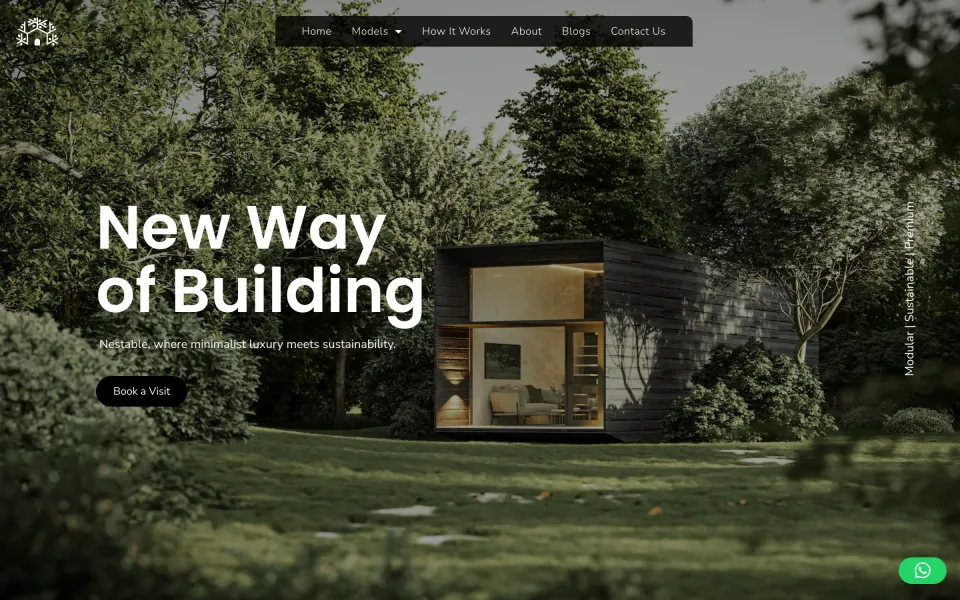
NestableBuilt on WordPress
A modular home builder with three models. Each model has its own page and brochure, the build is shown as one timeline, and every page ends on the same step: book a visit.
We work from email accounts on your domain, in your Slack and board. Your assigned Project Manager works your business day and aims to reply within 2 working hours during a project.
Each unique template has one price, and pages that reuse a template cost much less. The price is agreed in writing and changes only if the scope does, after you’ve approved the change.
Most Figma to WP projects
Figma or PSD to WordPress
Your design, built as a WordPress site, one unique template at a time.
$100per template
+ Set-up and launch $150 per project
5 business days for the first template, +2 for each extra · on time, or a full refund
Any one item works as a pilot, but one template from your Figma or PSD tells you the most: you see the global
classes, the editing screen and the side-by-side check, all on your own design.
Your first project is paid through escrow, and the money is released as you approve the work.
Not happy with it? We fix it within 5 business days. Still not happy? You don’t pay (once per agency).
Like every fixed-price project: on time, or a full refund.
It’s $100 per unique template, plus $150 once per project for set-up and launch (staging, WordPress set-up, QA and the launch itself). Extra pages built from an existing template are $50 each, so a 5-page site from 3 templates comes to $550. That’s a fixed price agreed in writing, and what your client pays is up to you.
It’s turning a Photoshop design file into a working WordPress website: one that matches the design and lets your client edit the content in the WordPress dashboard. We build it in Bricks Builder or as a custom theme, responsive at every screen size, at the same price per template as a Figma file.
A developer opens the layered file and lists its unique layouts; those become the templates in your quote. Fonts, colours and spacing are read from the layers and set once as global classes, and the images come from the layers or from the originals you send. Then each template is built in Bricks Builder or a custom theme, with content your client can edit, and someone who didn’t build it checks it against your artboards at 6 breakpoints before it goes on staging for your review.
By hand. We don’t use a Figma to WordPress plugin, because the tools that convert a file automatically tend to produce markup that’s hard to edit and harder to maintain. We build from your components, styles and variables, in Bricks Builder or a custom theme, which keeps the site fast and keeps your client able to edit it.
First a developer reviews the Figma file for missing mobile frames, states and components. Colours, type and spacing are set once as global classes, and each unique layout becomes a template in Bricks Builder or a custom theme, built on a staging site. Someone who didn’t build it compares it with the design at 6 breakpoints; then you review it, and then it launches.
Yes. Your client’s team can change words and images and the design holds, because colours, type and spacing are set once, as global classes, for the whole site. They also get a handover document in your branding, and a walkthrough video if your order includes one.
A single landing page from your Figma takes 3 business days. For a full site it comes down to the number of unique templates: 5 business days for the first template, +2 for each extra. That makes 3 templates 9 business days, and additional pages add 1 business day per 5 pages. Set-up and launch fits inside the build time. Your signed order gives the exact delivery date, and the clock (in business days) starts the business day after your Ready-to-Start checklist is complete. If we miss the date for a reason on our side, the whole project fee comes back.
Elementor, yes, when it’s a hard requirement; Divi, no. Our default is Bricks Builder or a custom theme, because they give cleaner, lighter pages that your client can still edit (our Bricks vs Elementor guide sets out why). If your agency needs Elementor, or your client’s site is built in it and staying that way, we build in Elementor. If the current site runs on Divi, we rebuild it from your Figma in Bricks or a custom theme and move the content across.
You do, on our recommendation. The written scope names the one we’d pick and why, and you approve it. Bricks suits sites your client’s team will edit visually; a custom theme suits sites that need custom logic or the leanest possible code. The price per template is the same either way.
Then we tell you what’s missing when we review it (usually mobile frames, states or components). You can finish the file yourself, or we design the missing templates in Figma at $150 each, desktop and mobile.
Figma, Adobe XD and layered PSD files, with Figma as our default. We don’t work from Sketch files or flat images. Whatever the format, a developer reviews the file and tells you what’s missing before we quote.
That’s the standard we build to, and we check it before you do: someone who didn’t build the site compares it with your design at 6 breakpoints, and you get the side-by-side screenshots. Anything that doesn’t match the design you approved is a defect, and we always fix defects free.
On a staging copy on your subdomain, password-protected and set to noindex, on your hosting or your client’s. It sits in your accounts from day one, and all rights in the work pass to you once the order is paid. Third-party plugins, themes and fonts keep their own licences.
Premium licences are bought in your client’s name, or by us at cost once you’ve approved it in writing. Either way, the quote lists every plugin and what its licence costs.
We map every old URL to its new one with a 301 redirect and carry over titles, descriptions and alt text, and nothing touches DNS until you’ve signed off the launch checklist. That protects what the site already has in search. Nobody can promise rankings or traffic on top of that, and we’d be wary of anyone who does.
Yes. One template from your Figma or PSD makes a good pilot, and any one item qualifies. It’s paid through escrow and released as you approve the work. If you’re not happy, tell us within 5 business days of the staging handover and we’ll fix it within 5 business days. Still not happy within 5 business days of the fix? You don’t pay, as long as the work hasn’t been used in production. Each agency gets one pilot.
Send us the file. We’ll build the WordPress site under your agency’s name, exactly as designed.