On time, or a full refund.How the guarantee works

White label WordPress development

Lean WordPress sites, under your name.

A Starter Site is $1,150, designed and built in 15 business days. Already have the Figma? $100 per template.See hours by region

White label WordPress development for agencies: sites in Bricks Builder or a custom theme, WooCommerce stores, and a site your client can run without ringing you every week. Senior developers work your business hours, and the price stays fixed unless the scope changes.

  • On time, or a full refund
  • 30-day bug warranty
  • SEO-safe rebuilds
  • Speed measured at handover

White label WordPress website design and build, at fixed prices.

Each site has one fixed price, agreed in writing. It moves only if the scope does, and only after you’ve approved the change. Everything included is listed on the card.

Black Friday 202620% off every WordPress price below, for orders signed by 30 November 2026.Quote BLACKFRIDAY20

Business Site

Bigger sites with a blog, news or team section.

Was $2,400, now $1,920fixed price

25 business days · on time, or a full refund

Everything in Starter Site, plus:

  • Up to 20 pages from 10 unique templates
  • A custom post type: blog, news or team
  • One form integration with a CRM or email platform
  • Performance report at handover

A 20-page site with a blog, designed and built, fits here.

WooCommerce Store

A store that lives inside a WordPress site.

Was $2,500, now $2,000fixed price

30 business days · on time, or a full refund

  • Custom design, built in Bricks Builder, up to 8 templates
  • Up to 50 products imported
  • Payments, shipping and tax set up
  • Checkout tested end to end with test orders
  • Checked for common WCAG 2.2 AA failures
  • Editing guide and video in your branding
Not sure what you need?

Tell us about the site on a 20-minute call. Within 2 business days of the call you’ll have a written scope, a fixed price and a turnaround.

Or send a brief

Quoted at a fixed price after the call:

  • Rebuilds and migrations
  • Larger WooCommerce catalogues
  • Multilingual sites
  • Custom integrations
  • Monthly hours for ongoing work

New to us? Start with a pilot project, paid through escrow.

Add-ons and single services

For sites that already exist, or to add to any build.

  • Build from your Figma: WordPress

    One template from your design, in Bricks or a custom theme your client can edit.

    Was $100, now $80 per template5 business days for the first template, +2 for each extra

  • Set-up and launch

    Once per project built from your Figma: staging, set-up, QA, launch and handover.

    Was $150, now $120 per projectIncluded in the build time

  • Additional page

    On an existing template, with QA.

    Was $50, now $40 per page+1 business day per 5 pages

  • Landing page

    One page, up to 8 sections, designed and built, with form and tracking connected.

    Was $350, now $2805 business days

  • Integration

    A CRM, email platform or booking tool, connected through an existing plugin, app or connector, beyond what a build includes.

    Was $100, now $80 per integration2 business days

  • Additional language

    Set up in WPML or Polylang. The translation itself isn’t included.

    Was $250, now $200 each3 business days

  • Content migration

    Pages or posts moved onto the new site and checked by hand. The method is our call.

    Was $100, now $80 per 25 pages or posts3 business days per 100 pages or posts

  • Speed and Core Web Vitals

    For a site we didn’t build. Ours already come with a speed report at handover.

    Quoted after we look at the siteDate in the quote

  • Website audit

    SEO, speed, accessibility and security on an existing site, as a PDF.

    Was $250, now $2003 business days

  • Accessibility fixes

    Full WCAG 2.2 AA fixes and a report, for a site we didn’t build.

    Was $100, now $80 per template1 business day per template, 3 minimum

  • WordPress care

    Weekly updates, backups where the platform allows, monitoring and a monthly report in your branding.

    Was $50, now $40 per site / monthOnboarding check within 3 business days

White label WordPress development services, from design to care.

Agencies that outsource WordPress development to us tend to do one of two things: hand over the whole site, design included, or send a finished Figma for us to build. Both are here, and so is the care afterwards.

01

How our WordPress sites get built.

Every WordPress site we build has to pass four checks before your client sees it. Pick one to see what we look for, and how.

  1. Your client’s team changes words and images on the page itself, and the design holds.

    • Bricks Builder or a custom theme, explained in the scope
    • Global classes, so one change updates every page
    • Content is editable; the styles are locked
    • An editing guide in your branding
  2. Every plugin is more code to update and secure, so we add as few as the site needs.

    • Theme code instead of a plugin wherever it’s cleaner
    • Plugins from official sources, never nulled or unlicensed
    • Every plugin and its licence listed in the quote
    • Speed targets on key templates, lab-tested at handover
  3. Nobody edits the live site. Each change is tested on staging, and live is backed up before the change goes over.

    • A full backup of the live site first, files and database
    • Internal QA on staging, then your review
    • Pushed live in a quiet hour, with a rollback point kept
    • Pages, forms and redirects checked on live straight after
  4. A WordPress site is about as safe as its settings, so we go through them on every site before launch.

    • File editing in the admin turned off
    • Login protection and security headers set
    • Named accounts with the least access the job needs
    • You switch our access off at handover

02

We work as part of your agency, in your tools.

We work as if we were on your staff, so your client only ever deals with your agency.

  • Your email, your name

    Your Project Manager works as name@youragency.com, and the WordPress user we log in with is on your domain too.

  • In your Slack and board

    Tasks, staging links and questions land where your team already works, so nobody learns a new tool.

  • On your hours

    Your Project Manager works your business day and aims to reply within 2 working hours during a project.

  • No trace of us

    Our name isn’t in the footer, the theme’s style.css, the generator tag or a single code comment.

How we work as part of your agency

Written into every WordPress order.

  • On time, or a full refund.

    The delivery date goes in your signed order. Miss it for a reason on our side and the whole project fee comes back.

    How the guarantee works
  • 30-day bug warranty.

    Anything we built that breaks in the first 30 days after launch is fixed free, however small.

    What the warranty covers

How white label WordPress development compares with a freelancer or an in-house developer.

Three ways to get a client’s WordPress site built. Each is the right call for someone, and the last row says who.

A white label WordPress agency, a freelancer and an in-house developer, compared
White label agency (StudioPartner)FreelancerIn-house developer
Who does the workA team, with an assigned Project Manager and a named backup inside your agency’s toolsOne personOne person, on your payroll
How it’s pricedA fixed price per site, agreed in writingBy the hour or per projectSalary and on-costs, every month
Who checks the buildOur internal QA, before you see itYouYou
Cover for holidays and illnessThe named backupNone, unless you arrange it. When they’re ill or busy, your project stopsNone, unless you employ a second developer
Best whenYou resell websites regularly and the work has to look like your agency’s ownThe job is small and well defined, and you can check the work yourselfWeb work is steady all year and central to what you sell

Our guarantees are in writing, starting with on time, or a full refund.

The full comparison, in our outsourcing guide

The WordPress engineering in every build.

Every site is built to these standards from the first day, whoever designed it. If your client hands it to another developer in two years, this is what they’ll find.

  • Clean, standard code

    Code another WordPress developer can pick up in an afternoon.

    • Custom code written to the WordPress Coding Standards
    • Output escaped and input sanitised, the WordPress way
    • Scripts and styles loaded only on the pages that need them
    • Every change checked on staging before you see it
  • An editor your client can use

    Bricks Builder or a custom theme, chosen per project.

    • Bricks: global classes and components, so content changes and the design holds
    • A custom theme when the site needs custom logic, with fields for every editable part
    • Custom post types and fields for content that repeats
    • No bloated themes or stacks of add-on packs
  • Performance

    Fast on a mid-range phone, with the lab report to show it.

    • Built to LCP (2.5 s) and CLS (0.1) targets on key templates, with responsiveness checked
    • Measured in a lab test on a mid-range phone, and the report is yours at handover
    • Responsive images in modern formats, sized per breakpoint
    • Page caching set up on your client’s host
  • Technical SEO

    Easy for Google, and for AI answers, to read.

    • Semantic HTML: one H1, ordered headings, real buttons and links
    • Structured data, XML sitemaps and clean permalinks
    • Editable titles and descriptions through the site’s SEO plugin
    • A redirect map whenever a build replaces an existing site
  • Accessibility

    More of your client’s visitors can use it.

    • Checked against the common WCAG 2.2 AA failures
    • Full keyboard use with visible focus, including menus
    • Colour contrast, form labels and error messages checked
    • Motion reduced for visitors who ask their device for it
  • Security and licences

    Nothing on the site depends on us after handover.

    • WordPress hardened and security headers set
    • Plugins from official sources, never nulled
    • Every plugin, licence and login listed in the handover doc
    • A backup before we change a live site, where the platform allows

WooCommerce development.

Stores built into the WordPress site your client already runs, with a checkout that’s tested before anyone pays through it.

Example test orders, run before launch.

WooCommerce or Shopify?

WooCommerce
When the store has to live inside a content-heavy WordPress site, or needs product rules and checkout logic that apps can’t handle.
Shopify
When your client just wants a reliable store, with hosting, security and checkout looked after for them. If that’s the better fit, we’ll say so.

How we test a WooCommerce store

  • Every payment method tested with a real test order, 3-D Secure included
  • Payment webhooks checked, so paid orders never sit as “pending”
  • Tax, shipping zones, coupons and free-shipping thresholds tested
  • Order and account emails sent through authenticated SMTP, so they arrive
  • Guest checkout, accounts and refunds tested end to end
  • Checkout and cart kept free of scripts they don’t need
What the package includes, and what it doesn’t
Included
Up to 8 custom-designed templates, up to 50 products imported, payments, shipping and tax set up, and the checkout tested end to end.
Quoted separately
Larger catalogues, custom checkout rules and connections to stock or accounting systems, each at a fixed price after a short call.
Paid by your client
Hosting, premium extensions and payment gateway fees, on your client’s own accounts. Every licence is listed in the quote.
After launch

An update that breaks the checkout costs your client sales, so on a store we test updates before they go live. Our Commerce Care plan runs a checkout test after every update and reports it in your branding. See care plans

WordPress work we’ve designed and built.

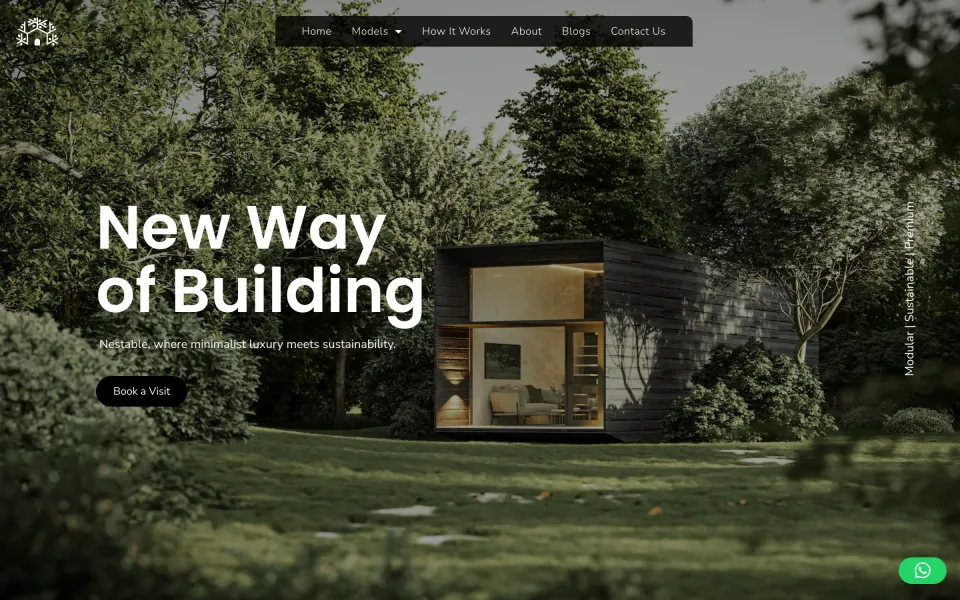
Here’s one our team designed and built on WordPress.

  • The Nestable homepage, headed New Way of Building, over a photo of a timber cabin among trees.

    Web design & development · 2025

    NestableBuilt on WordPress

    A modular home builder with three models. Each model has its own page and brochure, the build is shown as one timeline, and every page ends on the same step: book a visit.

    About this project: Nestable
See all work

Shown with written consent. Your own clients’ work only ever appears here if you say so.

How does white label WordPress development work, start to launch?

A Business Site takes five steps, each with a date and something in your hands at the end of it. The components are planned before the build starts, and nobody edits the live site.

See the full process

  1. Brief and scope

    We review the brief or the current site: pages, content, plugins and integrations. You get a written scope, the plugin list with any licence costs, and a fixed price.

    Day 0–2Scope and plugin list
  2. Design and build plan

    Templates designed in Figma, then each one mapped to components, global classes and post types before the build starts.

    Weeks 1–2Figma and component map
  3. Build on staging

    Built in Bricks or a custom theme on a staging copy, on your subdomain. You get a written update every week, with a staging link.

    Weeks 2–4Weekly update and staging link
  4. QA and speed

    Internal QA before you see anything, 6 breakpoints on real devices, forms and emails tested, and LCP and CLS measured in a lab test on key templates.

    Week 4QA and speed report
  5. Launch and handover

    Backed up and switched live in a quiet hour, redirects checked, then the editing guide, the technical doc and the 30-day bug warranty.

    Week 5Handover pack

Your clients’ plugins, and how we set them up.

Hover or tap a plugin to see what we set up in it. We work with the stack your client already has, so if they pay for a plugin, that’s the one we configure.

Builders and editors

Bricks Builder or a custom theme, with the native editor for posts.

  • Bricks BuilderOur builder of choice: templates, global classes, components and query loops, with clean, fast output.
  • GutenbergThe native editor for posts and simple pages, styled to match the site.
  • GenerateBlocksLightweight layout blocks for sites that stay on the native editor.

Custom fields and content

Structured content your client fills in once and the site shows everywhere.

  • ACF ProField groups and options pages, shown through Bricks dynamic data or the theme.
  • Meta BoxCustom fields and relationships for structured content.
  • PodsCustom post types, taxonomies and fields.
  • Custom Post Type UIPost types and taxonomies for portfolios, events and listings.

SEO and redirects

Titles, schema and sitemaps set up, and every old URL sent somewhere useful.

  • Yoast SEOTitles, meta, schema and XML sitemaps, with sensible templates per post type.
  • Rank MathSchema, sitemaps and on-page templates.
  • SEOPressMeta, schema and redirects with a small footprint.
  • All in One SEOSitemaps, schema and social meta.
  • Redirection301 redirect maps and 404 monitoring after a migration.

Forms

Forms that reach the right inbox and the CRM, and keep spam out.

  • Gravity FormsMulti-step forms, conditional logic and CRM or webhook feeds.
  • WPFormsContact and lead forms with spam protection and notifications.
  • Fluent FormsFast forms with integrations and conversational layouts.
  • Formidable FormsCalculators, directories and data-driven forms.
  • Contact Form 7Simple contact forms, hardened against spam.

Speed and caching

Tuned to the host, so the site stays fast after launch.

  • WP RocketPage cache, delayed JavaScript, critical CSS and lazy loading, tuned to pass Core Web Vitals.
  • LiteSpeed CacheServer-level page and object cache on LiteSpeed hosts.
  • Redis Object CacheA persistent object cache for query-heavy and WooCommerce sites.
  • ImagifyBulk image compression and WebP conversion.
  • ShortPixelImage compression with AVIF and WebP.
  • CloudflareDNS, CDN, firewall rules and edge caching.

Security and backups

Login protection, monitoring and a restore point before every change.

  • WordfenceFirewall, malware scanning and login protection.
  • Sucuri SecurityAudit log, file-integrity monitoring and hardening.
  • Solid SecurityHardening, two-factor login and brute-force protection.
  • Two-FactorTwo-factor login for admin and shop-manager roles.
  • UpdraftPlusScheduled off-site backups with one-click restore.
  • WP StagingStaging copies for testing changes before they go live.

WooCommerce and payments

The store, its payments and the extras your client’s customers expect.

  • WooCommerceStore set-up, product structure, tax, shipping and checkout customisation.
  • StripeCards, Apple Pay and Google Pay, 3-D Secure and webhook checks.
  • PayPal PaymentsPayPal, Pay Later and card fields at checkout.
  • Klarna PaymentsPay-later at checkout.
  • MollieEuropean payment methods: iDEAL, Bancontact and SEPA.
  • Flexible ShippingRate tables and shipping rules by weight, zone or cart total.
  • FiboSearchInstant product search with live suggestions.
  • PDF InvoicesBranded invoices and packing slips.

CRM and email

Leads and customers flow to the tools your client’s team already uses.

  • HubSpotTracking code, forms and contact sync into HubSpot.
  • SalesforceWeb-to-lead and API sync from forms and checkout.
  • KlaviyoOn-site tracking and WooCommerce event feeds.
  • MailchimpAudience sync, abandoned-cart and order automations.
  • BrevoForms, email and SMS sync.
  • WP Mail SMTPAuthenticated email, so form and order emails arrive.
  • ZapierForms, orders and new users sent on to thousands of other apps.

Multilingual

Languages with their own URLs, so each one can rank.

  • WPMLLanguage set-up, string translation and hreflang-safe URLs.
  • PolylangA language switcher and a translated content structure.
  • TranslatePressVisual front-end translation and per-language SEO.
  • WeglotAutomatic translation with a human review workflow.

Analytics and consent

Tracking that adds up, and a consent banner that controls it.

  • Site Kit by GoogleGA4, Search Console and PageSpeed data in the dashboard.
  • GTM4WPGoogle Tag Manager with a clean dataLayer and WooCommerce events.
  • PixelYourSiteMeta, TikTok and Google pixels, and conversions API.
  • ComplianzCookie consent that blocks scripts until visitors agree.
  • CookieYesA cookie banner with consent logging.

Hosts and staging

We work on your client’s host, on a staging copy first.

  • WP EngineEnvironments, deploys and caching set up on the client’s WP Engine account.
  • KinstaStaging, CDN and caching on the client’s Kinsta account.
  • PantheonThe Dev, Test and Live environments, used for staging and safe pushes.
  • CloudwaysManaged cloud servers with staging and backups.
  • SiteGroundSiteGround caching and performance settings.

Something missing? If there’s a plugin for it, we connect it for $100 per integration. If it needs code written against an API, we quote it after a call.

Rebuilds and migrations to WordPress.

The old site stays up until the day we switch. Every page is moved and checked, and every old URL is redirected to its new home.

  • An older WordPress theme
  • Elementor, Divi and other builders
  • Wix
  • Squarespace
  • Webflow
  • Drupal or Joomla

Example Squarespace move: each old URL gets a new one.

What moves across

  • Pages and posts, with their images and authors
  • Categories, tags and custom post types
  • Each page’s SEO title and description
  • Forms, rebuilt and tested with the same notifications
  • Media, renamed and compressed on the way in
  • Products, customers and orders on WooCommerce sites
  • Every old URL, 301-redirected to its new home
What can’t move as it is, and what we do instead
Layouts from another builder
Shortcodes and builder markup don’t convert cleanly. We rebuild each template in Bricks or the custom theme, and move the words and images into it.
Old plugins
Each one is replaced with theme code or a single reputable plugin. The replacements, and any licence cost, are in the quote.
Passwords
User passwords can move between WordPress sites. From other platforms they can’t, so users get an invite to set a new one.
How we protect what already ranks
  1. Crawl the old site and export every URL
  2. Map each one to its new URL
  3. Carry over titles, descriptions, alt text and structured data
  4. Import the redirects before launch
  5. Crawl again after launch, and watch Search Console for 30 days
Our SEO-safe launch process

Hosting, licences and who pays.

Everything stays in your name or your client’s: the site, the code, the accounts and the bills. The quote lists all of it before we start.

What’s included, in full
The site
Runs on your client’s own hosting account. We work on it; we never own it.
Theme, files and designs
Built in your accounts from the first day: the site and its Bricks templates or theme files on your client’s hosting, the designs in your Figma. All rights pass to you once the order is paid, so there’s nothing to give back. Third-party plugins and themes keep their own licences.
WordPress access
Named user accounts on your domain, with only the access the job needs. You switch them off at handover unless the site is on a care plan.
Hosting
We don’t sell hosting. Your client pays their host directly, and we set it up or migrate it once, free, on your client’s own host account.
Premium plugins and themes
Bought in your client’s name, or by us at cost with no markup. Every licence is listed in the quote.
Domain and email
Stay with your client’s registrar and email provider. We only change the records we need to, and tell you which.
Payment fees
Stripe, PayPal or other gateway fees go to your client’s own account.

After launch: care plans that keep it healthy.

Every build comes with a 30-day bug warranty. After that, a WordPress site that nobody looks after slowly breaks: plugins fall behind, and sooner or later something stops working. Our care plans cover it per site, per month (updates, daily backups, uptime and security monitoring, a set amount of edits and a monthly report in your branding), and your client only ever hears from your agency.

WordPress maintenance and support plans

Start with one small WordPress job.

Any one item can be your pilot. A landing page or a single template is enough to see how we build in WordPress, and how we keep you posted while we do it.

  • Your first project is paid through escrow, and the money is released as you approve the work.
  • Not happy with it? We fix it within 5 business days. Still not happy? You don’t pay (once per agency).
  • Like every fixed-price project: on time, or a full refund.

WordPress questions.

What agencies ask before they resell their first WordPress site.

All questions

It’s a WordPress site that a partner builds and your agency sells under its own name. With us, that means a site in Bricks Builder or a custom theme, or a WooCommerce store, at a fixed price: a Starter Site is $1,150 and takes 15 business days. Your client only ever deals with you, and we never contact them.

It means your agency sells the WordPress site as its own work, and we design and build it behind you. We write from an email address on your domain and work in your Slack and on your board. The site sits on your client’s hosting from the first day, and nothing in the code or the admin mentions us. You set your client’s price, and the relationship stays yours.

Send a brief or your Figma file, or book a 20-minute call. Within 2 business days of the call you’ll have a written scope, a fixed price and a turnaround, and nothing is charged until you sign the order. From there we build on a staging copy on your subdomain. Our own QA checks it before you do, you review it, and we launch in a quiet hour with a handover document.

A Starter Site (up to 10 pages) is $1,150, a Business Site (up to 20 pages) is $2,400 and a WooCommerce Store is $2,500. Each is a fixed price, with the design included. If you already have the Figma, building it is $100 per template, plus $150 for set-up and launch (once per project).

Only if the scope changes: more templates or pages, an extra integration, or a brief that changes after sign-off. We price the change in writing and add nothing until you approve it. Our own delays never cost you anything extra; if one makes us miss the date, the whole fee comes back.

A freelancer is one person, so when they’re ill or busy, your project stops. Here every project has an assigned Project Manager and a named backup working inside your agency’s tools, and our internal QA checks every build before you see it. The guarantees are written into your order, starting with on time, or a full refund. And you get a fixed price instead of an hourly estimate.

Either; we choose per project. Most of our sites are built in Bricks Builder. Its output is clean, fast HTML, and its global classes and components let your client’s team edit content without breaking the design. When a site needs custom logic or the leanest code we can write, we build a custom theme instead. If Elementor is a hard requirement (your agency asks for it, or your client’s site is built in it and staying that way), we build in Elementor. We don’t use Divi or heavy multipurpose themes.

Bricks is our default because it’s fast, writes clean markup and keeps styles in global classes and reusable components, so sites stay quick and editors can’t knock the design out of shape. A custom theme makes more sense when the site needs custom logic, an unusual content structure or the smallest possible footprint. Your scope says which one we recommend, and why.

No. We write from an email address on your domain and work in your Slack and on your board, and the WordPress user we log in with is on your domain as well. Our name isn’t in the footer, the theme’s style.css, a generator tag or any code comment.

A Starter Site takes 15 business days, a Business Site 25 business days and a WooCommerce Store 30 business days, counted from the day we have everything we need. The date is written down at kickoff, and if we miss it for a reason on our side, the whole fee comes back.

Yes. We build each template exactly as designed, in Bricks or a custom theme your client can edit, and test it at 6 breakpoints on real devices. It’s $100 per template plus $150 for set-up and launch (once per project). Extra pages on an existing template are $50 each.

Yes. In Bricks, your client’s team edits text and images right on the page, and because the styles sit in global classes and components, the design holds. On a custom theme, each editable part has its own field. Every build comes with an editing guide, plus a video in your branding if your order includes one.

Yes. The WooCommerce Store package covers a custom design of up to 8 templates, up to 50 products imported, payments, shipping and tax set up, and a checkout tested end to end before launch. If Shopify would suit your client better, we’ll tell you.

WooCommerce, if the store has to sit inside a content-heavy WordPress site or needs product rules and checkout logic that apps can’t handle. Shopify, if your client would rather have hosting, security and checkout looked after for them. We build both, and we’ll recommend one.

As few as the site needs, all from official sources (never nulled). Where theme code does the job more cleanly than a plugin, we write theme code. Premium licences are bought in your client’s name, or by us at cost with no markup, and the quote and the handover doc both list every plugin and licence.

A managed WordPress host that fits the site’s traffic and budget. We work with WP Engine, Kinsta, Pantheon, Cloudways and SiteGround, and which one we suggest depends on the site. We don’t sell hosting ourselves. Your client pays the host directly, on an account they own, and we set it up or migrate it once, free.

We harden every site before launch: file editing in the admin turned off, login protection on, XML-RPC off unless the site needs it, and security headers set. Our accounts are named, have only the access the job needs and use two-factor login. Before we change a live site we take a backup, where the platform allows.

On the key templates we build to an LCP under 2.5 s and a CLS under 0.1, and check responsiveness too. We measure them in a lab test on a mid-range phone at handover and send you the report. They’re targets we build to, and we don’t guarantee them: plugins, scripts and content added after launch can move them. Our care plans keep an eye on that.

Yes. We audit it, rebuild each template in Bricks or a custom theme, map every URL to its new home with a 301 redirect, and crawl the site again after launch. If we missed a redirect in the map we built, we fix it free during the 30-day warranty. Nobody can promise rankings after a rebuild, so we won’t. What you can hold us to is the redirect map, both crawls and that warranty.

You do. We work in your accounts, so from the first day the site and its Bricks or theme files sit on your client’s own hosting and the designs sit in your Figma. All rights in the work pass to you once the order is paid, which leaves nothing to hand back. Third-party plugins and themes stay under their own licences.

Anything we built that breaks in the first 30 days is fixed free. After that, a WordPress site needs regular updates, backups and monitoring, and our care plans do that per site, per month, with a report in your branding.

Yes. Pick any one item as a pilot. It’s paid through escrow and released as you approve the work. If you’re not happy, tell us within 5 business days of the staging handover and we’ll fix it within 5 business days. Still not happy within 5 business days of the fix? Then you don’t pay, as long as the work hasn’t been used in production.

Quote your client a WordPress site today. We’ll build it under your agency’s name.

Next, you send a short brief and we reply with a fixed price and a delivery date in writing. You pay nothing until you sign the order.

See pricesStart a project