We’d like to see how people use our site with Google Analytics and PostHog, including recordings of clicks and scrolls. Anything you type is hidden. Nothing runs unless you accept.OK to use Google Analytics and PostHog?Cookie Policy
A WordPress developer on your board every month, without the hire.
Hire WordPress developers by the month and they join your agency’s board: 40 or 80 hours of our team’s time, or one dedicated WordPress developer who is yours full time. They build in Bricks Builder or the client’s custom theme, always on a staging copy first, logged in as WordPress users on your domain. Start dates depend on capacity, so we check it and then agree the day with you.
What a WordPress developer does in a normal month.
This is the work a plan is for, once a client’s site has launched. Every bit of it happens on a staging copy, and nothing reaches the live site until you’ve approved it.
New pages and templates
Built in Bricks Builder, or in the site’s custom theme.
New pages on the templates the site already has
New templates from your Figma, with their global classes and components
Custom post types, fields and archive templates
Header, footer and navigation changes
Forms, plugins and integrations
As few plugins as the site needs, each one listed.
Forms connected to your client’s CRM or email platform, with spam protection
A plugin set up and tested, or theme code where that is cleaner
Tracking tags and consent tools added or corrected
Licences bought in your client’s name, or by us at cost
WooCommerce changes
Tested with a test order when cart or checkout is touched.
Products, variations, categories and attributes
Shipping zones, tax rules, coupons and free-shipping thresholds
Payment methods, and the webhooks that mark an order paid
Order and account emails sent through authenticated SMTP
Fixes on a site someone else built
We read the theme and the plugin list before we change either.
Layout bugs at a breakpoint, on real devices
A form, a search or a filter that has stopped working
A plugin conflict found on staging and removed or replaced
Editing guides for your client’s team, in your branding
Speed, SEO basics and accessibility
We work on the templates; we don’t promise scores or rankings.
Images, fonts and scripts cut back on slow templates
Titles, descriptions, schema and canonical URLs on new templates
Common WCAG 2.2 AA failures fixed: contrast, focus, labels
LCP and CLS measured in a lab test before and after
Launches and moves
Pushed live in a quiet hour, with a rollback point kept.
A staging build pushed to your client’s hosting
A redirect for every URL that changes
Content moved from an older theme or another builder into Bricks
Pages, forms and redirects checked on live straight after
How one WordPress task gets from your board to the live site.
There’s no repository to review on WordPress, so the staging copy does that job. Every change goes through the same six steps.
01
The task lands on your board
Your team writes it as they would for a colleague, and sets the priority. Your Project Manager asks for anything missing: the page, the Figma frame, the login.
02
A full backup, then a staging copy
Files and database are backed up first. Then the work moves to a staging copy, on your hosting or your client’s.
03
The change is made on staging
In Bricks Builder or the custom theme, using the site’s existing global classes and components where they fit.
04
It’s tested on staging
Forms are submitted, the changed templates are opened at 6 breakpoints, and on a WooCommerce site a test order goes through. On Flex 40 and Studio 80 a second person does the testing; a Dedicated Developer tests their own work, with the Project Manager overseeing it.
05
You review the staging link
Your Project Manager posts the link in your tool. The live site stays as it was until you say yes.
06
It goes live in a quiet hour
We push it live and keep a rollback point. Then pages, forms and redirects get checked again, this time on the live site.
One change, from backup to live
Update · yourclient.comPricing section on the Services page0 of 7 done
Full backup of liveFiles and database · restore point kept
Staging copyOn yourclient.youragency.com
Change made on stagingPricing section added in Bricks
Internal QA on staging6 breakpoints, forms and links on staging
Approved on stagingSigned off by Your agency
Pushed liveAt 06:30, a quiet hour for the site
Live checkedPages, forms and redirects · rollback ready
Staging yourclient.youragency.com
Push to live
Live yourclient.com
Updated 3 SepRestore point 06:12
Example update to a WordPress site.
Routine plugin and core updates, daily backups and uptime monitoring belong on a care plan, which is priced per site.
On most sites it comes down to three things: a WordPress user, a way into the hosting, and the licences. You create each one, so you can remove each one.
A named user for each person. The Administrator role where the work touches plugins, the theme or site settings, and Editor where it is content only.
Hosting and staging
The host’s control panel or SFTP, to take the backup, make the staging copy and push it live. The hosting account stays your client’s (we don’t sell hosting).
Bricks and plugin licences
In your client’s name, so updates keep arriving after we leave. If you’d like us to buy one, it’s at cost, and only once you’ve approved it.
WooCommerce and payments
For store work, the gateway’s test mode or sandbox keys, so a test order can be placed without charging a card.
The site’s email
When a task touches form or order emails, access to the SMTP service the site sends through, so we can see that a test message arrived.
How logins reach us
Through your password manager. Each WordPress user and hosting login belongs to one person and has two-factor authentication switched on.
Afterwards
You delete our WordPress users and hosting logins. We send a list of any API keys created along the way, so you can replace them.
What’s in a WordPress plan, and what isn’t.
A plan buys time on the WordPress work your clients send. It doesn’t change what we build in, or who pays the host.
Covered by the hours
Development in Bricks Builder or a custom theme, on new and existing sites
WooCommerce set-up and changes, tested with test orders
Design and second-person testing, on Flex 40 and Studio 80
A backup and a staging copy before each change
Editing guides for your client’s team, in your branding
Not covered
New builds in Divi or heavy themes
We build in Bricks Builder or a custom theme, and in Elementor when it’s a hard requirement. We can move a site off another builder, and the hours cover that work.
A designer, on the Dedicated Developer plan
That plan buys a developer and nobody else. New template designs come from your team, or out of Flex 40 or Studio 80 hours.
Weekly updates, daily backups and uptime checks
Those are care plans, priced per site per month, with a report in your branding.
The host and the plugin makers’ bills
Your client pays them directly. We don’t sell hosting or resell licences.
Page copy and photos
We place what you or your client supply. Page copy isn’t part of a plan, though we can write it for an extra fee, quoted before we start. Photography we don’t do at all.
Speaking to your client
We don’t, unless you ask. Then it’s from an address on your domain, with you copied in.
A promise about rankings or speed scores
We measure LCP and CLS before and after, and report both. We don’t promise a number.
Your assigned Project Manager, and the WordPress developer.
One keeps the queue moving. The other is in wp-admin and Bricks.
The Project Manager runs the queue
Your assigned Project Manager keeps the tasks for all your WordPress sites in one list, in the order you set, and checks each has the page, the Figma frame and the login before the developer picks it up.
You direct the work
Your team briefs in your chat or on your board. The developer stays our employee or contractor, so pay, tax and leave are our problem.
With a Dedicated Developer
You brief the developer yourself, as you would a WordPress developer on your staff. The Project Manager oversees the work, and is the person to talk to about the plan itself.
A WordPress plan, from the first day.
Day 1
You create WordPress users on your domain and give hosting access for each site.
Updates come from
name@youragency.com, in your tool, once a week.
Briefs arrive on
Your board, in your chat or by email.
Work happens on
A staging copy, after a full backup.
You sign off on
The staging link, before the push to live.
At the end
The sites are on your client’s hosting already. You delete our users.
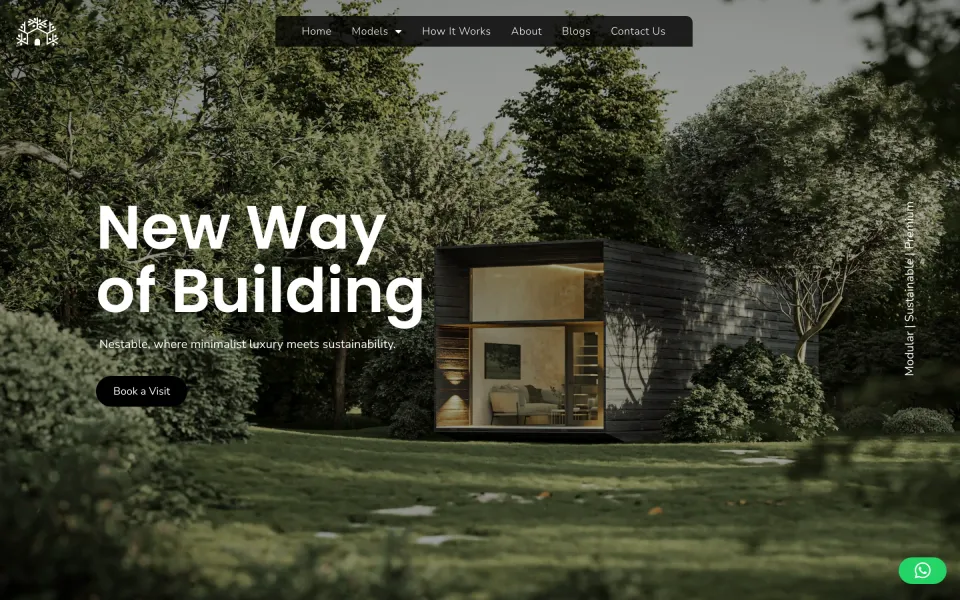
None of our plan work can be shown here, so this is a WordPress site our team designed and built at a fixed price instead.
Web design & development · 2025
NestableBuilt on WordPress
A modular home builder with three models. Each model has its own page and brochure, the build is shown as one timeline, and every page ends on the same step: book a visit.
Working hours and updates are service targets, and the on-time refund doesn’t cover them. If we materially miss the same one two months running and don’t fix it within 10 business days of your written notice, you can end the plan at once and get back prepaid fees for the unused period.
A freelancer, an employee, a project order or a monthly plan?
Four ways to get WordPress work done for your clients. Each has a catch, and it’s in the last row.
A freelance WordPress developer, one on staff, a fixed-price build and a monthly plan, compared
A freelance WordPress developer
A WordPress developer on staff
A fixed-price build from us
A monthly plan from us
Suits
You know one good WordPress developer and have time to brief and check them
WordPress work fills a full-time role all year and is central to what you sell
The scope is known up front: a site, a WooCommerce store, a template from your Figma
Edits, fixes and small builds arrive every week, across several client sites
Backups and staging
Their own habit. Ask how they do it before they touch a live site
Your process, if your agency has written one down
Built on staging on your subdomain, and backed up before it goes live
A full backup and a staging copy before each change
Who tests the change
You
You, or a colleague
Our QA at 6 breakpoints on real devices, before you see staging
A second person on Flex 40 and Studio 80. On the Dedicated Developer plan, the developer
Cost
Their hourly or day rate
Salary and on-costs every month, busy or not
One fixed price per site or per template
One fixed fee a month
If it goes wrong
Whatever you agreed with them
Your team fixes it
On time, or a full refund, then a 30-day bug warranty
Service targets, with no refund. Hour plans end on 30 days’ notice
The catch
One person. When they are ill or booked, the site waits
Hard to fill their week in a quiet month
Every job needs a scope before it starts
You pay for the month even when the queue is short
If a freelancer you trust already handles your WordPress work well, keep them. A plan starts to make sense when the work needs a Project Manager and QA around it.
These are the WordPress questions. Rollover, the on-time refund and the placement rule work the same on every platform, so they’re answered once, on the plans page.
From us, by the month: Flex 40 is $1,200 for 40 team hours, Studio 80 is $2,200 for 80, and the Dedicated Developer is $3,200 for one senior developer, full time. Hosting and plugin licences are separate and stay with your client. A job too small for a plan is $40 an hour, quoted first.
Yes. That’s the Dedicated Developer plan: one senior WordPress developer on your sites and no other agency’s, for a 3-month minimum and then month to month. Flex 40 and Studio 80 are 40 or 80 hours a month, spread however suits you; during those hours we work on nothing else.
Bricks Builder or a custom theme, whichever suits the site, and WooCommerce stores in Bricks. When Elementor is a hard requirement (your client’s site is built in it and staying that way, say), we work in Elementor. We don’t build new sites in Divi, but we can move a site off it.
No. WordPress work is done on a staging copy, after a full backup of files and database, and then pushed live. With no repository, the staging link is what you review. We use Git for Shopify themes and headless builds only.
They can, but it’s rarely the best use of them. Weekly updates, daily backups and uptime checks are what a care plan is for, from $50 per site per month. Plan hours suit the work around updates: a plugin that needs replacing, a conflict found on staging, a template that broke.
Yes. Products and variations, shipping zones, tax rules, coupons and payment methods are all plan work. Whenever cart or checkout is touched, a test order is placed and we check that the payment webhook marked it paid and the order email arrived.
Yes, and for one defined job it’s the better buy. A build from your Figma is $250 per template plus $250 for set-up and launch, and it carries our on-time refund, which plans don’t. A plan suits work that keeps arriving and can’t be scoped job by job.
Not from us. Their WordPress user and email address are on your domain, and our name isn’t in the footer, the theme’s style.css or any code comment. If your client asks, the developer says they’re on your web team, without claiming to be your employee.
Very little. The sites are on your client’s hosting and the licences are in your client’s name, so nothing has to be moved. You delete our WordPress users and hosting logins, and we send a list of any keys to replace. Hour plans end on 30 days’ written notice, and the Dedicated Developer on the same notice once its 3-month minimum has passed.
Tell us what a normal WordPress month looks like, and we’ll staff it under your agency’s name.
 Bricks Builder
 ACF Pro
 Meta Box
 Gravity Forms
 WooCommerce
 Stripe
 PayPal Payments
 Klarna Payments
 WP Rocket
 Yoast SEO
 Redirection
 UpdraftPlus